3.- System Design
Immersive VEs can be implemented in various operational environments, mainly determined by the output devices. In this study, we targeted a stereo display system [21]. An ideal system would require tracking both the head and eye-gaze simultaneously to allow arbitrary motion of the user; however, eye-gaze tracking could be very costly and intrusive. In our application, users need to wear a pair of polarized glasses which makes eye-gaze tracking challenging since the user’s eyes are not visible. To keep things simple, we decided to obtain a rough estimate of eye-gaze by tracking the head and estimating its orientation. Developing a more accurate eye-gaze tracking system (e.g., by mounting small cameras on the frame of the glasses) is a part of our future work.
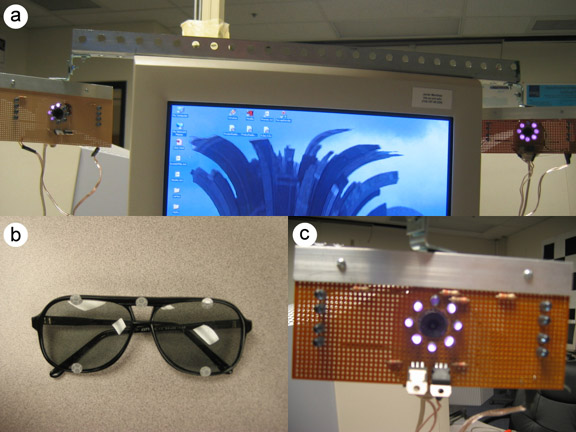
Figure 2. Hardware setup: (a) camera setup on the computer, (b) eye-glasses with IR reflective markers, (c) camera close-up with IR LEDs.
To make head tracking fast and robust, we took advantage of the requirement that the users have to wear glasses by placing several markers on the frame of the glasses. This approach simplifies detecting the head without being intrusive. A challenging issue in designing the system was how to deal with illumination since any kind of external illumination could interfere with the stereo display device (e.g. projector-based) and disturb the user. To deal with this issue, we decided to use IR LEDs for illumination and IR reflective markers as shown in Figure 1. A high-pass filter was installed on the cameras to block visible light from entering the camera sensor. The filter used in our setup was the Kodak Wratten 97c filter which has a cut-off limit of 800nm.
The system contains three modules as shown in Figure 2: (a) a vision module, (b) a PLOD module and (c) a rendering module. The vision module detects the position, orientation and uncertainty of the user’s head and passes it to the PLOD module, which takes into account the physiological and psychological aspects of the human vision to calculate the LOD at which to draw the elements. Finally, the rendering module draws everything on the screen at the calculated LOD.

Figure 3. Block diagram of the whole system.