Table Of Contents
Section 1: Introduction
1.1 Scope
1.2 System Overview
1.3 Document Overview
1.4 Related Documents
Section 2: General Description
2.1 Product Description
2.2 Product Characteristics
2.3 User Characteristics
2.4 General Constraints
2.5 Assumptions
Section 3: Component Requirement Specification
3.1 Object Model
3.2 Data Dictionary
3.3 Communications Model
(Object Interaction Diagram, Object Hierarchic Diagram)
Section 1: Introduction
1.1 Scope
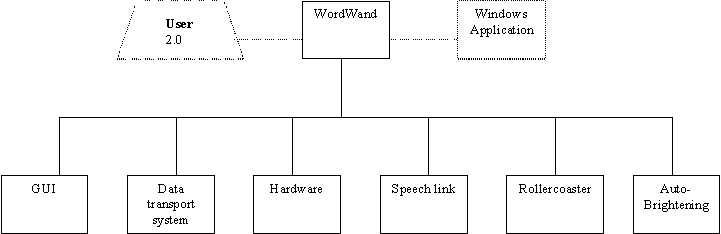
The Word Wand GUI will be broken down into the following components:
¡¤ The GUI it's self
¡¤ The Data Transport System
¡¤ Speech Recognition Link
The Word Wand GUI, Data Transport System, and Speech Recognition Link comprise the 'hub' of the Word Wand application. They are responsible for the transport of information between the systems of the Word Wand application, as well as the interface to the user, allowing for the changing of various hardware and software settings.
1.2 System Overview
Main Purpose of System
Team VPI's main goal is to develop the User Interface and the linkage of the various components of the Word Wand System. The group is responsible for developing the following components:
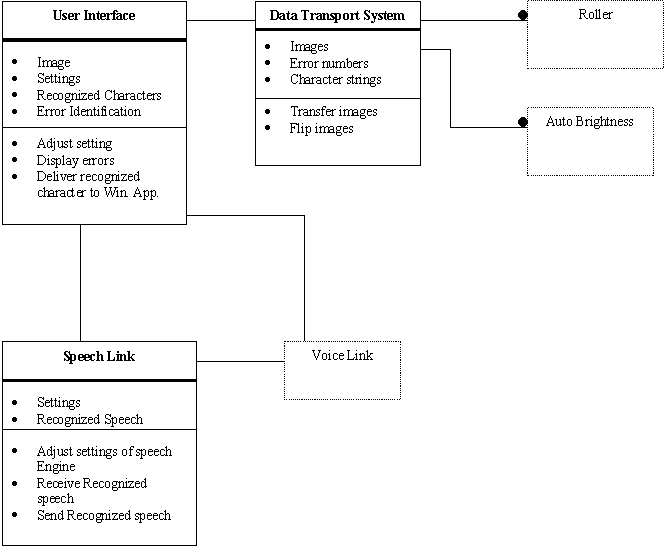
User Interface: The User Interface to the Word Wand Application. This interface allows the user of the application to adjust the various settings of the system.
Speech Link: This is the link between the rest of the Word Wand application and the speech recognition engine. Through this link, settings to the voice engine, as well as 'understood' words will be communicated. The speech recognition engine it's self is provided by and vendor outside of the project.
Voice Engine: The vendor provided speech recognition engine. The group need only be concerned with interfacing this engine to the rest of the application(This interfacing includes the passing of settings to the engine, and the return of recognized words from the engine)
Data Transport System: (newly added with changes in overall system architecture) The system that transports information(specifically the bit maps in their various forms) between the many components of the system, including the Word Wand hardware, the image processing systems, the OCR systems, and the Windows application that is to receive the characters that have been scanned. This transport system also manipulates some of the data, performing such operations as reversing the image, changing information internal to the image, and passing settings(both current, and changed by user) both to and from the various components of the Word Wand Application.
1.3 Document Overview
Section 1: Introduction
1.1 Scope
1.2 System Overview
1.3 Document Overview
1.4 Related Documents
Section 2: General Description
2.1 Product Description
2.2 Product Characteristics
2.3 User Characteristics
2.4 General Constraints
2.6 Assumptions
Section 3: Component Requirement Specification
3.4 Object Model
3.5 Data Dictionary
3.6 Communications Model
(Object Interaction Diagram, Object Hierarchic Diagram)
1.2 Related Documents
1) Books
Programming in Window95
Programming Windows 95 by Charles Petzold, Microsoft Press.
Software Engineering
Text Book title
2) Manuals
(Voice engine product name)
Documentation and Manual of Voice Recognition System.
3) URL
WordWand
http://www.wordwand.com/
4) Lecture Notes
CS426 lectured by Prof. Fayad
5) Software Developement Plan
Section 2: General Description
2.1 Product Description
The WordWand is a line scanner linked to the WordWand interface, OCR engine, and the active Windows application. The WordWand application runs in the background while your word processor or other native Windows application runs in the foreground. Wordwand's Voice Recognition is a process accomplished by software that allows a user to interact with his or her computer partially by voice. This interaction takes place through the use of a voice recognition engine provided by another vendor. This engine will be linked to the WordWand application through the GUI, which will then send the information collected to the Windows application
Another part of our project is to develop a new Graphical User Interface (GUI) for the Wordwand. Today's major operating systems provide a graphical user interface such as windows, pull-down menus, buttons, scroll bars, iconic images, wizards, the mouse, and no doubt many things that haven't been invented yet. Our goal is to create the look-and-feel GUI along with its input devices for Wordwand's product.
2.2 Product Characteristics
Team VPI is delivering several components for the Word Wand application. These components include the Data Transport System, GUI, and Voice Link. The Data Transport System is the 'glue' of the entire application, providing a means of transporting information between the many systems that comprise the Word Wand application. This transport system moves(mostly) an image class between the hardware, image processing, and OCR systems. The characteristics of the transport system include:
¡¤ The ability to manipulate the data it transports(i.e. flipping, changing formats, etc.)
¡¤ The ability to pass the data between various sub systems(hardware, image processing, OCR, and display)
¡¤ The ability to route the information between the various components of the Word Wand Application.
The characteristics of the GUI include:
¡¤ An easy to use, intuitive interface to the various settings the user can and may need to change during the use of the Word Wand application.
The characteristics of the Voice Link include:
¡¤ The ability to communicate with the external speech recognition engine, including the ability to pass settings to the engine, and receive recognized numbers from the engine.
¡¤ The ability to disable and enable the speech recognition engine based on what the user requests through the GUI
¡¤ The ability to change the 'load characteristics' of the speech recognition engine based on whether the user wishes to have the engine resident in memory at the startup, or later, if at all.
2.3 User Characteristics
There are 2 basic types of users for the systems produced by VPI. The first type, is an actual human-the user of the Word Wand. This user is assumed to be familiar with the general look and feel of a Windows Application.
The second type of user relates only to the Data Transport System. The users of this system are the other systems of the Word Wand application. They include the hardware interface systems, image processing systems, OCR system, and the GUI.
2.4 General Constraints
Word Wand will only be currently available on the 'x86' class machines running Microsoft Windows 95 or NT operating systems. The application will also only be useful on those systems equipped with a properly configured RS-232 serial port, or USB interface, and of course, a Windows application that accepts text.
2.5 Assumptions
¡¤ Properly configured hardware that is compatible with the hardware device exist on the system
¡¤ The user has some familiarity with the Windows interface
¡¤ The application is being run on a 486 or more powerful system
¡¤ The various other systems in the project are implemented and functioning properly
¡¤ That it is conceivable that we actually get the darned thing done!
Section 3 Component Requirement Specification
3.1 Object Model
3.2 Data Dictionary
|
User Interface |
The User Interface to the Word Wand Application. Allows the user of the application to adjust the various settings of the system. |
|
Data Transport System |
The system that transports information(specifically the bit maps in their various forms) between the many components of the system. |
|
Speech Link |
The link between the rest of the Word Wand application and the speech recognition engine |
3.3 Communication Requirement Specification
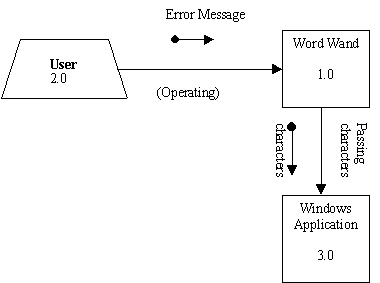
Object Interaction Diagram
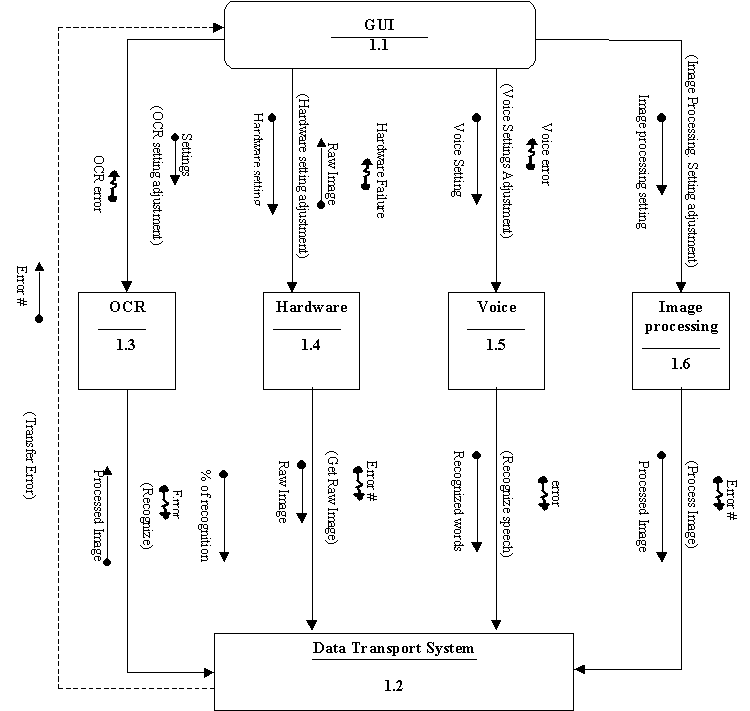
Object Hierarchic Diagram