Building the Nevada AI Research Institute Website
Overview edition · Detailed edition
This playbook, like the software it describes, was written by an AI agent under the direction of its user. Nothing in it has been reviewed by security, privacy or university IT specialists. It describes a working prototype on a single machine, not a production university service.
Contents
- 1. Abstract
- 2. The first prompt (verbatim)
- 3. The agent's first response (verbatim)
- 4. What happened next
- 5. What it took from the user
- 6. Limitations and required expert review
- 7. References and data sources
1. Abstract
This playbook records how the website of the Nevada AI Research Institute (NAIRI) at the University of Nevada, Reno was built by talking to Claude, an AI coding agent from Anthropic, in Claude Code. The site is a Django and PostgreSQL application on a single Ubuntu machine. It lists AI funding calls, faculty and their publications, projects, events, playbooks, videos, news and a blog. An administrative assistant curates it from a review queue and can edit any wording on the site in place.
The first day, 7 September 2026, produced the plan, the running site, a daily agent that searches Grants.gov and other sources for funding calls and new faculty, and a first real crawl. The rest came in short sittings over the next four weeks:
- a morning AI news gathering, run as a Claude Code skill;
- MatchMaker, which proposes faculty teams for open calls and cites each member's papers;
- a static copy on a CSE department web server, with a password-protected teams page;
- funding sources for Defense, DARPA, Labor, Agriculture, Education and SAM.gov, and a blog.
The user wrote 102 prompts and no code. The agent wrote about 16,000 lines of Python, including 464 tests, in about 50 commits, over about 11½ hours of working time. With no API key, relevance is scored by keywords rather than a language model, and the weekly newsletter, the chat assistant and the local-model connection are not yet built.
The playbook gives the prompts verbatim, leaving out 17 housekeeping ones, with what the agent did and where the user's judgement changed the course. No security, privacy or university IT specialist has reviewed it.
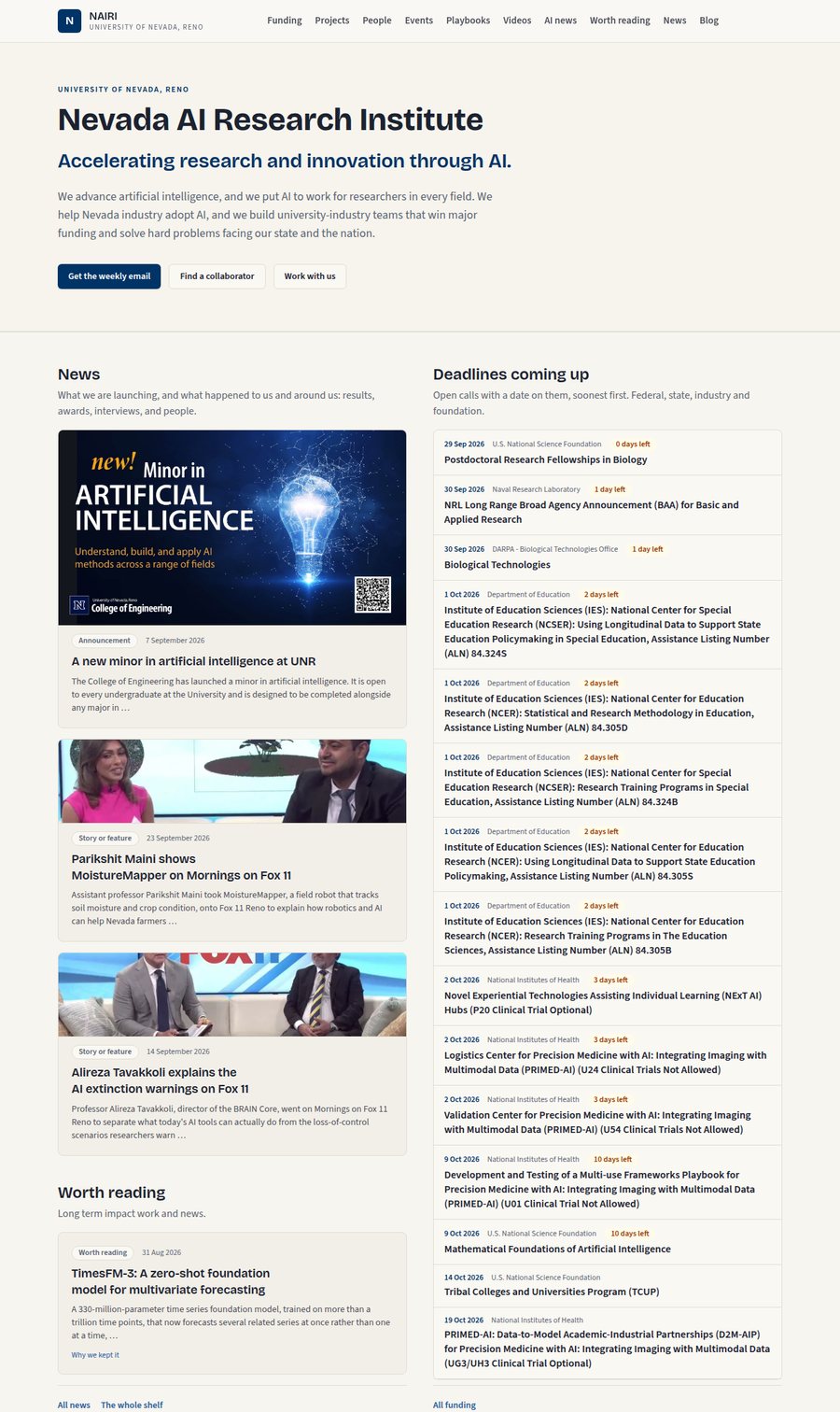
The home page as published on 29 September 2026. News on the left, led by the Minor in AI; the open funding calls on the right, soonest first.
2. The first prompt (verbatim)
Monday 7 September 2026, 13:14 PDT. Everything that follows grew from this one message.
I want to 1. Install a database backed website for the Nevada AI Research Institute at UNR. […] The website will connect faculty interested in AI at UNR. We want to highlight AI related funding opportunities, funded and unfunded projects, upcoming events, and such. We also want an easy interface through an admin role to access and validate the entries in the database from which the website is populated. We want an agent that runs every day to scour federal, state, industry and other promising websites for new funding opportunities, new faculty that have joined UNR that might be interested in AI, and for any results from Nevada AI Research Institute (NAIRI) catalyzed projects to be a candidate for being highlighted on the website. Curated websites should be validated and stored in a database table. Note that projects need not be funded and might simply involve help given to local businesses and their success with AI. We will want people to create an account on the website so that they can register to receive a weekly email. This email will be drafted by an AI - a local open weight AI running on a dgx spark on this network and then edited by the admin before being sent out to everyone through […] UNR email. I will also want support for an AI conference we will be holding once a year for the state. This conference will include academia, industry, state government, K-12, utilities, and others. We will also host a library or repository of AI playbooks which will need to categorized and be searchable. Faculty should be able to find suitable partners in order to quickly form teams and apply for funding. We will also need a youtube channel for project and other videos or we will need our own self hosted video respository. What else might be a good idea to get the NAIRI website off the ground and received well? Ask. We want a good business - like website, clean, modern, but warm and sporting some subtle hint of UNR wolfpack blue. We should identify ourselves as part of the Pack AI initiative. The website database curator will be an admin assistant so make sure the curaton can be done really easily. The website itself will be maintained by our system administrator. Ask questions, then make a good plan, then we can go step by step. Once the plan is approved we can switch to Opus and sonnet for execution.
3. The agent's first response (verbatim)
The agent (Fable 5.1) first looked at the machine (its operating system, network and installed software), wrote a plan to a file, and then replied:
The plan is written to docs/PLAN.md. Here is the short version for approval.
Architecture. One Docker Compose stack on this machine: Caddy for automatic HTTPS, Django 5 with Gunicorn, PostgreSQL 16 with pgvector, Redis, and Celery for the scheduled jobs. Tailwind and HTMX for a clean, fast front end with no Node runtime to maintain. An LLM provider module talks to the Anthropic API today and swaps to the DGX Spark by changing one setting.
Curation. A dedicated review queue at
/curate/, not raw Django admin. Every agent find and member submission arrives as a card with the extracted fields beside the source snippet, with Approve, Edit and approve, Reject, and Merge buttons plus keyboard shortcuts. The sources table has a "Test crawl" button so the assistant can see what a new site yields before saving it. Staff accounts use two-factor authentication.Daily agent. Runs at 5 a.m. Pacific. It uses official APIs where they exist (Grants.gov, NSF, NIH, SAM.gov), RSS where available, and polite HTML extraction otherwise. Claude scores relevance, extracts structured fields, and explains its reasoning. Candidates land in the queue and the curator gets a morning digest.
Newsletter. Monday draft from the week's approved items, edited on the site in a rich-text editor with a real Outlook-tested preview, then pushed into your Outlook Drafts through Microsoft Graph with subscribers in BCC. You press Send. This needs an Azure app registration from OIT, which is the longest lead item, so I recommend requesting it this week.
Also covered. Faculty matching with embeddings and a "raise hand" button on each opportunity, a searchable playbook library with automatic tagging, a YouTube catalog, and a conference module with registration and abstract review. Section 14 of the plan lists twelve additions I recommend. The three I would prioritize are an "Ask NAIRI" consultation form that feeds success stories, a funding deadline calendar with reminders, and a student corner for capstone and internship matching.
Two concerns to flag before we start:
- This machine appears to be on a private home or office network (192.168.1.x with an AT&T IPv6 prefix), not on the campus network. A public UNR website needs a public route, a UNR hostname, and OIT's blessing. Building here is fine, but confirm where production will actually live.
- Brand approval. UNR Marketing will need to sign off on Wolf Pack marks and the Pack AI name on an official site. Worth a parallel email now.
Things I need from you to begin Phase 0, listed in section 15 of the plan: the sudo password or your sysadmin present for the Docker install, an Anthropic API key, and the intended hostname. Everything else can arrive during later phases.
Once you approve or amend the plan, a fresh Opus or Sonnet session can pick it up directly, since the plan file and the decisions are saved to memory. If you would like the plan as a shareable web page for your sysadmin and assistant, say so and I will publish it.
The user's reply, twelve minutes later, was:
Let's build on my home network and on this machine that is dedicated to the NAIRI website. I am the sysadmin and will be sitting here with your. Before proceeding, explain why we need docker and if we build and test it here without docker, can we add docker later?
The agent explained what Docker would and would not buy on one machine run by its own sysadmin, recommended building natively with systemd services instead, and listed the habits that would keep containerising cheap later. The user agreed, asked for the plan as a shareable page, then asked for it to be kept local, and added an AI chat assistant to the plan before saying "proceed".
4. What happened next
The work falls into eight sittings. Times are Pacific Daylight Time, taken from the Claude Code session transcripts. "Agent time" counts only the time the agent was working: waits of more than ten minutes for the user, such as a permission prompt left unanswered overnight, are left out. Prompt numbers count only the prompts shown in this playbook; 17 housekeeping prompts are left out at the user's request.
| Sitting | Prompts | Models | Agent time | What was built |
|---|---|---|---|---|
| Mon 7 Sep, 13:14 – 21:07 | 1–32 | Fable 5.1, Opus 5 | about 4 h | The plan; the running site with curation; the daily scout and a first real crawl; faculty records with Scholar profiles and papers; the front-page wording |
| Tue 8 Sep, 18:49 – 21:47 | 33–46 | Opus 5 | about 2½ h | Editable text everywhere; the AI news feed and its morning routine; announcements, the Worth reading shelf and pictures; preparing the box for the office |
| Wed 9 Sep, 11:11 – 21:05 | 47–49 | Opus 5 | under ½ h | Running on the campus network; what going public would take |
| Fri 11 – Mon 14 Sep | 50–53 | Opus 5, Sonnet 5 | under ½ h | News runs and the news skill, on a branch of the conversation |
| Mon 14 – Fri 18 Sep | 54–64 | Sonnet 5, Opus 5, Fable 5.1 | about 1½ h | The static copy on the CSE web server; MatchMaker; the password-protected teams page |
| Mon 21 – Fri 25 Sep | 65–71 | Fable 5.1, Opus 5.5 | about 1 h | Defense, DARPA, Labor, Agriculture, Education and SAM.gov sources; local TV interviews; level columns on the front page; sign-in without email |
| Mon 28 – Tue 29 Sep | 72–79 | Opus 5.5, Sonnet 5.5 | about 1½ h | Two-factor off; more people followed by the news run; the blog; one News section led by the Minor in AI; two new faculty |
| Sat 3 Oct | 80–85 | Opus 5.5 | in progress | This playbook |
In total the user sent 102 prompts, of which 85 are shown here. The agent made about 1,300 tool calls (shell commands, file edits, web searches and fetches, browser checks) and worked for about 11½ hours. The first prompt said the plan would be made first and the building handed to other models. That happened: Fable 5.1 planned, the user switched to Opus 5 at prompt 9, and five models appear in all.
The first day. From the first prompt the agent wrote PLAN.md,
installed PostgreSQL, Redis and Caddy natively for a Django1 site, with the user
typing the sudo password, and built three phases in an evening: the content models and public pages with a review queue for
the curator; the scout, a daily agent that searches Grants.gov2 and other feeds
for funding calls; and a faculty crawl of UNR department pages. With no API key, the agent
replaced the planned language model with a keyword scorer that shows its working. The
first real crawl put 29 genuine federal funding calls in the queue.
The user then asked, of a colleague who had been scored too low, "Definitely include Ankita". That one remark exposed three bugs in the scorer and a fourth that had been failing silently. A question later that evening ("Why can't you get to people's google scholar profiles?") overturned something the agent had told the user and built around: Google Scholar3 profile pages are open to robots, and the agent's own robots-file parser had been misreading rules on every source. Thirty-seven faculty ended up with linked Scholar profiles and 703 papers on record.
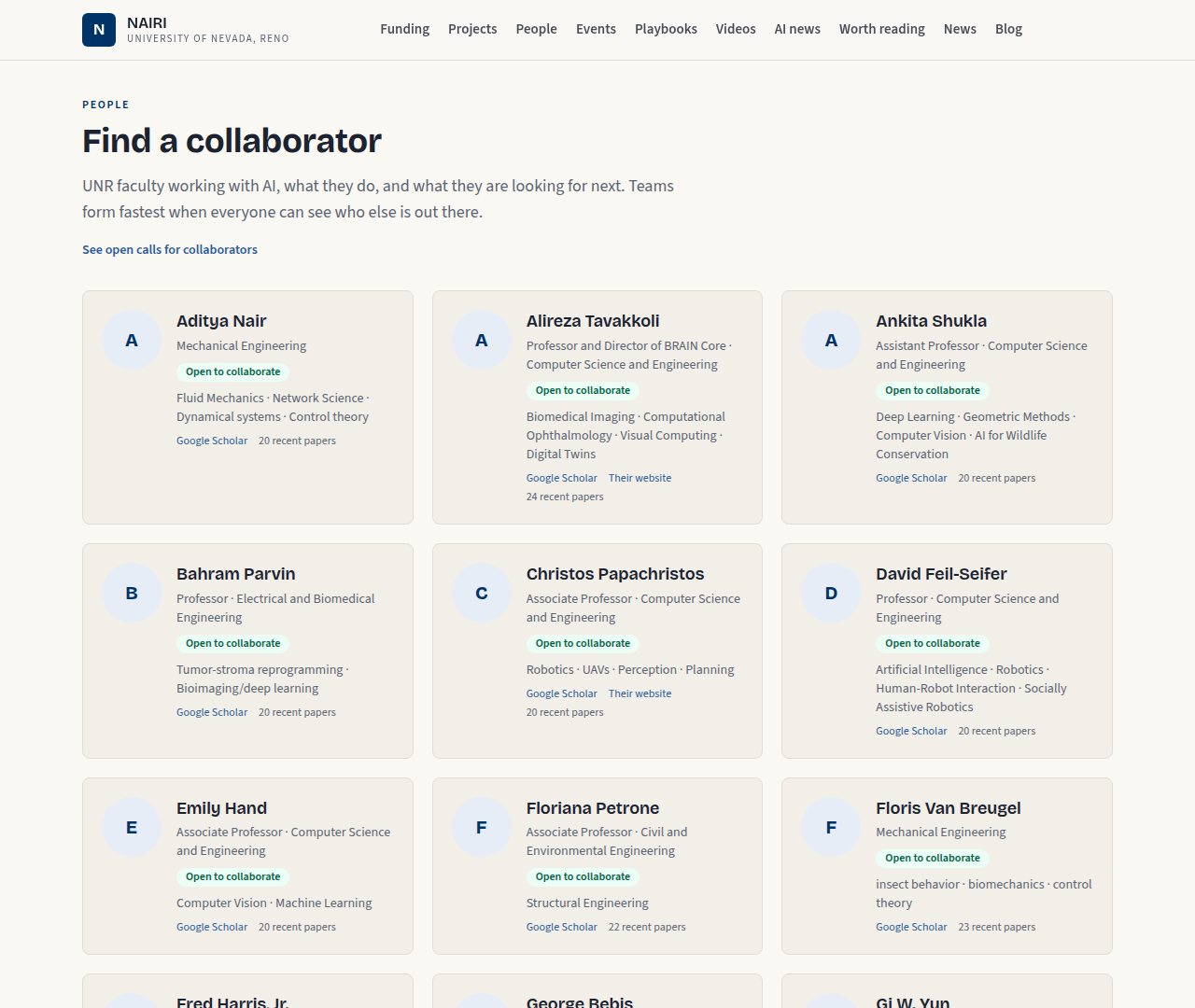
The People page. Each card links the person's Scholar profile and counts their recent papers.
The evening ended with ten prompts about one paragraph of front-page text. The user wrote and rewrote it, rejected "Supercharging", and finally said: "Let s agree on some text before we change the website again." The agent admitted it had kept removing a repeated "AI" the user kept putting back, and stopped. The same exchange exposed a real fault: Django's template cache meant the live site had been showing old wording.
The news, and the box goes to the office. The next evening the user asked for an AI
news feed refreshed every morning without an API key. The agent built a table, an ingest
command that refuses stale or duplicate items, and a /news command the user runs each
morning in Claude Code, which searches a fixed list of sources and writes summaries in
its own words. It also made every piece of wording on the site editable in place, after
the user said they found the front page "really difficult to edit". It then prepared the
machine to be carried to the user's campus office, finding on the way two settings that
would have silently broken sign-in or every page once debug mode was off.
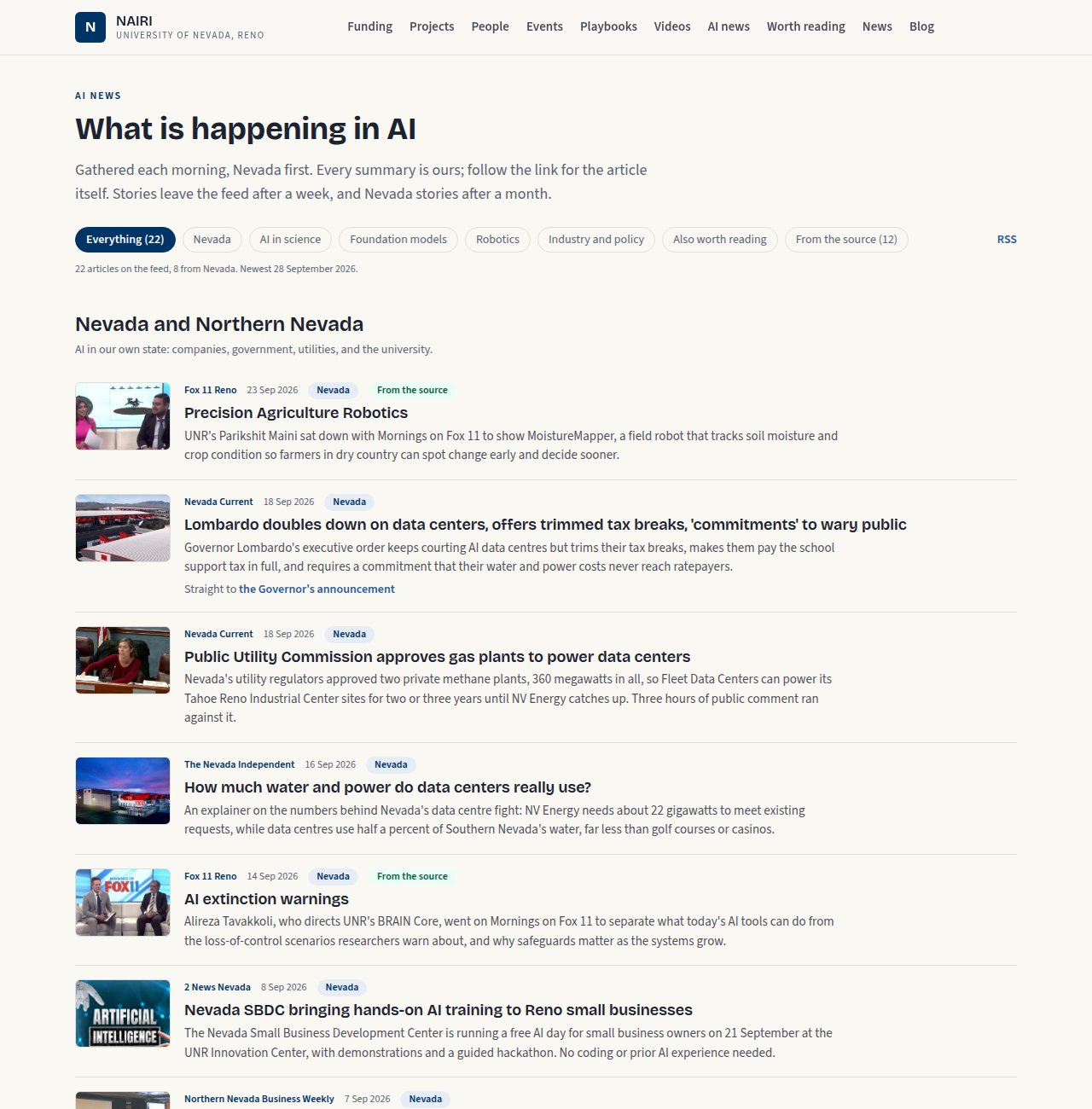
The AI news feed, Nevada first.
A public copy without a public server. The machine sits behind the campus firewall. Asked whether everything could run on the box and be copied to the user's existing CSE faculty web page, the agent built an exporter that renders every public page to files under the right subpath and checks every link, and a publish script that copies it over SSH.
MatchMaker. The user asked for a skill that proposes faculty teams for funding calls from their publications. The agent planned it first, then built it. It found that its earlier keyword shortlist named nearly the same ten people for every call, so the brief now carries the whole roster. Its first run proposed 13 teams for 18 open calls, each citing papers that exist in the database, and said plainly where no credible team existed. Approved teams appear on a password-protected page on the CSE copy, checked from outside after every publish.
The rest, as time allowed. New funding sources for the departments of Defense, Labor, Agriculture and Education and for DARPA, after the agent found that Grants.gov's agency filter silently returns nothing for departments with sub-agencies; a SAM.gov4 source that waits for an API key only the user can request; two local TV interviews; columns on the front page that measure themselves so they end level; sign-in without email or two-factor codes; more people followed by the news run; a blog; and one News section led by the new Minor in AI, using the program's flyer.
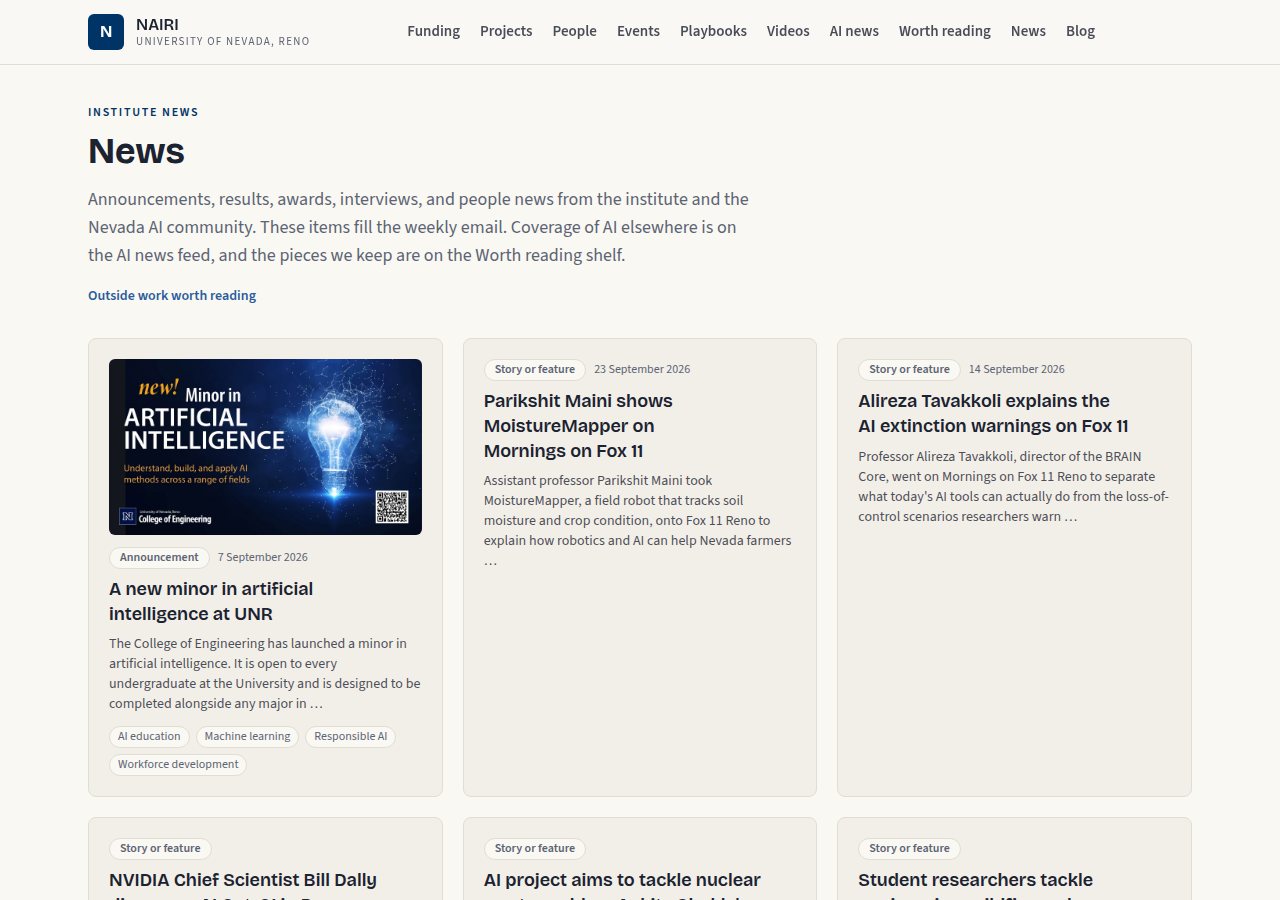
The News page after announcements and local stories were combined.
5. What it took from the user
The user wrote no code, but the project depended on the user throughout.
- Knowing what to ask for. The scope came in the first prompt: funding, faculty, projects, events, playbooks, videos, a newsletter, a conference and easy curation by an administrative assistant. So did the decisions that shaped it later: no Docker, keep everything local, cancel the public and internal split, publish a static copy.
- Seeing what the agent could not. The agent edited files and its tests passed, but the running service only changed when the user restarted it. Several times the user saw what the tests could not: an address still refused, a page returning an error, an approval that never landed, a sign-in asking for a code nobody remembered setting up.
- Local and professional knowledge. Which colleagues work on AI whatever their department page says, that Scholar profiles are public, which TV interviews had aired, and how a paragraph should sound to academic, industry and funder readers.
- Steering and restraint. Asking for a plan before building, for an explanation before a fix, and to agree on wording before the site changed again; dropping features that were not worth their cost.
The agent supplied the rest: the architecture, every line of code and every test, the
choice of data services and how to read them politely, the curator and sysadmin guides,
and measurements of its own results. Its limits were real. It could not type a sudo
password, restart the service, send email, request an API key, see the user's screen, or
change anything on the CSE server beyond the user's own folder, and it said so each time.
6. Limitations and required expert review
No specialist has reviewed this work. The most important caveats:
- The site runs on one desk machine with an address from campus DHCP, over plain HTTP, with two-factor authentication turned off and email confirmation optional.
- It cannot send email, so the weekly newsletter, sign-up confirmation and password resets do not work yet.
- Relevance is scored by keywords, and MatchMaker's proposals are argued from paper titles and venues, not abstracts.
- Faculty profiles were assembled from public pages their subjects did not write.
| Component | Discipline that would need to verify it |
|---|---|
| Sign-in, two-factor turned off, plain HTTP, the shared-password teams page | Information security |
| Faculty profiles, emails and publication records from public sources | Privacy and records policy |
| News summaries, and publisher pictures shown from their own servers | Copyright and university counsel |
| Funding data, eligibility and MatchMaker's team proposals | Research development and sponsored programs |
Hosting on a desk machine, backups, a future nairi.unr.edu |
University IT (OIT) |
| Use of UNR marks and the site's public voice | Marketing and Communications |
| Contrast, keyboard use and screen readers | Accessibility (ADA and WCAG) |
The detailed edition lists, for each component, what the implementation assumes, what the agent checked, and what is missing.
7. References and data sources
The detailed edition has the full list, including every library used. The main sources:
-
Django Software Foundation, Django 6.0. https://www.djangoproject.com/ ↩
-
Grants.gov search and fetch API, U.S. Department of Health and Human Services. https://www.grants.gov/api ↩
-
Google Scholar author profiles. https://scholar.google.com/ ↩
-
SAM.gov Get Opportunities Public API, U.S. General Services Administration. https://open.gsa.gov/api/get-opportunities-public-api/ ↩